 Creator
UI Component#
The UI Component element embeds another UI inside the current UI. This allows you to reuse common form layouts across multiple UIs without duplicating them.
For example, you can create a "Contact Information" UI with name, email, and phone fields, and embed it as a component in multiple other UIs that need contact data.
Choosing the embedded UI#
The embedded UI is selected in the UI Designer and stays the same for every run of that element.
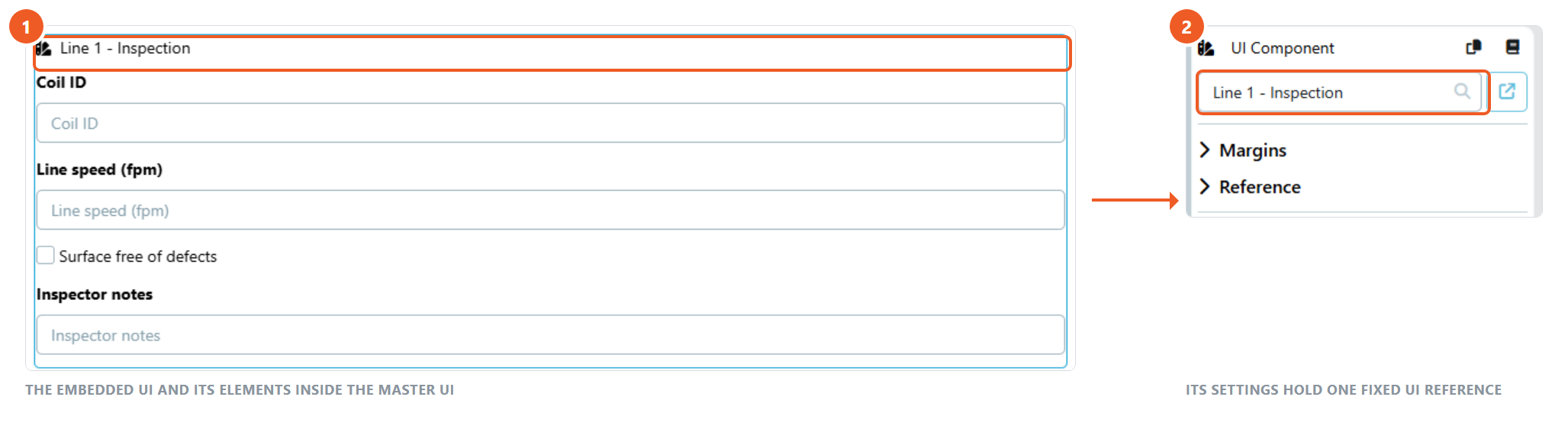
When the embedded form has to vary, for example per site, per line or per customer, keep the variable part in a separate UI and render it with its own UI node in variable mode. The UI node takes the UI ID from a Flow Variable, so the UI can come from a UI Selection property on a Business Object or from a UI Selection element the user filled in earlier in the run.
Tips#
- Changes to the embedded UI are automatically reflected everywhere it is used
- The embedded UI's form values are available as flow variables just like any other UI element
- This is useful for standardizing common form sections across your workflows
See UI Designer